

Proactive WordPress maintenance is essential for preventing downtime and ensuring the continuous operation of your website. By anticipating and addressing potential issues before they escalate, you safeguard your site against unexpected disruptions and security breaches.
Such an approach not only enhances site stability but also optimizes performance, fostering a seamless user experience and maintaining trust with your audience.
By prioritizing the below-mentioned WordPress maintenance proactive strategies, you can significantly reduce the risk of downtime and ensure your WordPress site remains secure, functional, and responsive at all times.
Difference Between Reactive and Proactive WordPress Maintenance
Understanding the distinction between reactive and proactive WordPress maintenance is crucial for website management.
Reactive maintenance refers to tackling problems only after they have already affected your site. This approach often leads to unexpected downtime, data loss, or security breaches, requiring emergency fixes to restore site functionality.
In contrast, proactive maintenance focuses on anticipating and preventing issues before they arise. This strategy involves regular updates of WordPress core, themes, and plugins, implementing robust security practices, and continuously monitoring site performance.
By adopting proactive maintenance, website owners can enhance site security, optimize performance, and minimize potential disruptions. Thus, ensuring a seamless experience for users and maintaining site reliability.
What to Expect: Monthly WordPress Maintenance Plans
Secure Your WordPress Future Now!
Keep your WordPress site secure and optimized; sign up for our Proactive WordPress Maintenance plan today, starting at just $99/month.
Essential Maintenance Tasks for WordPress Sites
Regular maintenance tasks are crucial for keeping your WordPress site running smoothly. This includes:
Update WordPress Core
By keeping the core up to date, you not only enhance your site’s security but also boost efficiency and stability. New updates often include patches for vulnerabilities and performance improvements, making them crucial for preventing potential security threats.
Moreover, these updates ensure compatibility with themes and plugins, providing a seamless experience for both site administrators and users.
Therefore, having a routine update schedule for the WordPress core is vital, as it helps safeguard your site from vulnerabilities and supports long-term stability and functionality.
Backup Strategies
By creating regular website backups, you secure the integrity of your WordPress site, safeguarding against unexpected data loss and potential site compromises.
Moreover, an automated backup system provides a reliable recovery path, allowing your site to be restored quickly in the event of a disaster.
Consistent site backup will help maintain data security and minimize downtime during recovery. Therefore, prioritizing regular backups as part of your WordPress maintenance routine is essential for ensuring your site’s resilience and stability.
Remove Unnecessary WordPress Plugins and Themes
To maintain your site’s performance and security, removing unnecessary WordPress plugins and themes is important.
Unused or outdated plugins can clutter your WordPress environment, potentially introducing security vulnerabilities or compatibility issues. Thus, streamline your site and keep only essential plugins and themes to reduce potential site vulnerabilities.
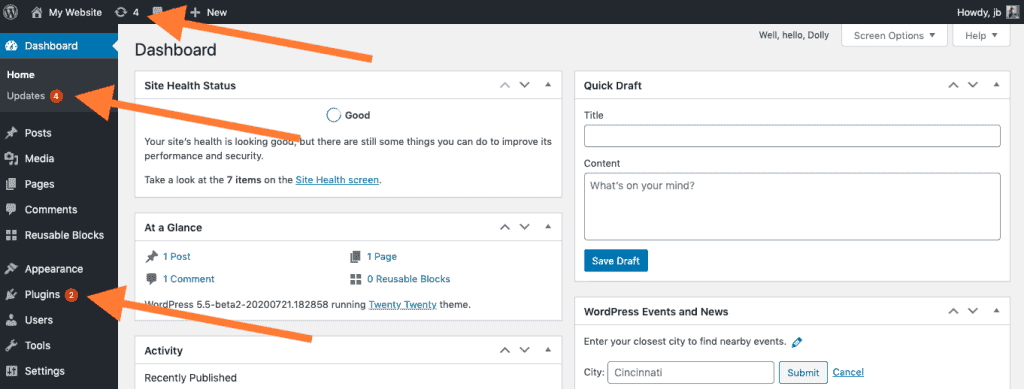
Additionally, consistently updating the plugins and themes you choose to retain is crucial. Updates often include security patches and performance improvements, which help prevent potential threats and ensure optimal functionality.
Security Checks
Regular security audits allow you to identify vulnerabilities before they are exploited, thereby fortifying your site against potential attacks.
Utilizing WordPress security plugins can also help you actively scan for malware and monitor suspicious activity, enhancing your ability to maintain a secure site.
Implementing robust security measures, including firewalls and intrusion detection systems, can further prevent breaches. These proactive manual maintenance efforts will ultimately safeguard your WordPress site and preserve user trust and data integrity.
Optimizing Your WordPress Website
Optimizing website speed and performance can enhance both user experience and search engine rankings. Here are some proactive strategies to boost website speed:

Implement Caching Solutions
Caching is crucial for enhancing your WordPress site’s speed and performance. Caching works by storing static versions of your web pages, allowing them to be served more quickly to visitors and significantly accelerating page load times.
As a result, this not only improves the user experience but also contributes to better search engine rankings.
Moreover, caching reduces server load by minimizing the need to repeatedly generate dynamic content, freeing up server resources and improving overall site efficiency.
To automate the process, you can utilize caching plugins that streamline it, reducing the need for manual intervention in site optimization.
By configuring caching settings to meet your specific needs, you can further refine performance, ensuring your site remains fast and responsive even during high-traffic periods.
Check out: Boost Your Site Speed with the Best LCP WordPress Plugins
Database and Image Enhancements
Enhancing the WordPress database and images is vital for improving your WordPress site’s efficiency and performance.
Efficient database management, such as optimizing database queries, leads to significant performance improvements, speeds up data retrieval, and reduces server load. This results in faster site speeds and decreased loading times.
Similarly, implementing image compression techniques reduces file sizes, resulting in faster page load times and an improved user experience. By optimizing image sizes and formats, you ensure that your site remains visually appealing while maintaining optimal performance.
Together, these enhancements bolster your site’s overall efficiency, making it more responsive and capable of handling increased traffic smoothly.
Learn about: WordPress Emergency Service to Handle a WordPress Site Crash
Securing Your WordPress Installation for Proactive Maintenance
This proactive WordPress maintenance task is vital for safeguarding your site against threats and ensuring a robust environment that protects your data and users’ experiences.

Proactive Website Security Measures
Implementing proactive security measures is essential for preventing unauthorized access and safeguarding your WordPress site from vulnerabilities.
A fundamental step is to ensure that all user accounts use strong passwords. This involves creating passwords that combine uppercase and lowercase letters, numbers, and symbols, and changing them regularly to enhance security.
Furthermore, data encryption plays a crucial role in protecting sensitive information. Installing an SSL certificate encrypts data transmission between the user and the server, preventing interception by malicious actors.
As mentioned above, regular updates to WordPress, including its themes and plugins, are also critical. By adopting these website security measures, you significantly reduce the risk of breaches and ensure a secure online presence.
Read about: WordPress Security Mistakes You Must Avoid
Regular Security Audits
Conducting regular website security audits is a critical step in maintaining the integrity and security of your WordPress website. By performing periodic security scans, you can detect malware and identify any vulnerabilities that may compromise your site’s security.
Utilizing comprehensive tools such as Sucuri or Wordfence enhances your security efforts by offering thorough scanning and real-time monitoring, helping you stay ahead of potential threats. If malware is detected, prioritize its prompt removal to minimize damage and prevent further breaches.
These regular audits not only reinforce your site’s security posture but also instill confidence in your clients, reassuring them of your commitment to safeguarding their data and ensuring a secure browsing experience.
WordPress Maintenance Tasks: Monitoring & Troubleshooting
This proactive WordPress maintenance task ensures swift issue resolution and helps maintain optimal site performance and a seamless user experience by promptly addressing potential problems.
Monitoring Your WordPress Site
Monitoring your site consistently helps identify potential issues early and maintain its overall health and performance.
- Regular Monitoring: Implement a routine schedule for monitoring your site to identify potential issues before they escalate into major problems. This proactive approach allows you to address concerns promptly, reducing the likelihood of disruptions or downtime.
- Instant Alerts: Leverage real-time monitoring tools that provide instant alerts regarding website downtimes, performance dips, and security threats. These alerts enable you to respond promptly to any irregularities, ensuring a swift resolution and minimizing any adverse impact on the user experience.
- User Experience: Regularly checking for broken links and errors is vital to maintaining a smooth and seamless user experience. Identifying and resolving these issues promptly ensures that visitors can navigate your site with ease, thereby enhancing their engagement and satisfaction.
- Performance Identification: Ongoing performance monitoring helps identify areas where your website can be improved. By analyzing load times, resource usage, and user interactions, you can pinpoint specific aspects to optimize, ensuring your site runs efficiently.
Learn: Key Signs Your Website Needs On-Demand WordPress Support Services
Troubleshooting Common Issues
Effective troubleshooting is essential for minimizing downtime and data loss on your WordPress site.

- Hosting Checks: When experiencing a site crash, it’s essential to first check with your hosting provider to rule out server-related issues. By confirming that your server is functioning properly, you can focus on diagnosing and fixing other potential causes of the problem.
- Backup Restoration: In the event of significant issues causing downtime or data loss, restoring your site from a recent backup can swiftly bring it back online. This strategy minimizes both the downtime users experience and the amount of data that might be lost due to unforeseen events.
- Plugin Conflicts: Sometimes, site issues arise from conflicts between plugins. By disabling all plugins and then re-enabling them one at a time, you can identify which plugin is causing the problem. This method allows you to resolve conflicts efficiently without disrupting your entire site.
- Troubleshooting Tools: Utilize specialized troubleshooting tools to effectively diagnose and resolve common site issues. These tools can help pinpoint errors and guide you through the process of fixing them, ensuring that your WordPress site remains operational and user-friendly.
Which is Better: Unlimited WordPress Support vs Pay-Per-Incident
Final Thoughts
Regular WordPress maintenance is crucial for ensuring a stable and secure online presence. By adhering to the strategies outlined in this guide, you can maintain a high-performing and thriving website.
These site maintenance practices, including regular updates, backups, and security checks, play a crucial role in ensuring the smooth operation of your site.
Furthermore, embracing proactive WordPress website maintenance not only fortifies your site against potential threats but also supports long-term success and stability.
Prioritizing these strategies will help you sustain a robust and user-friendly WordPress environment that continues to meet the demands of your audience.
FAQs About Proactive WordPress Maintenance
What is proactive WordPress maintenance and why does it matter?
Proactive WordPress maintenance helps website owners prevent downtime and security breaches. It utilizes regular updates, security scans, backups, and performance optimization to maintain the health of your WordPress site. This approach protects your data, improves user experience, and enhances SEO.
How often should I update WordPress core themes and plugins?
You should apply updates as soon as stable versions are available. This reduces security vulnerabilities and plugin conflicts. Routine updates also support compatibility checks and ensure better site performance.
What backup strategies should website owners follow to prevent data loss?
You should use automated backups and store copies in separate locations. A robust backup system serves as a safety net during malware attacks, server failures, or accidental data changes. Many owners use a staging site to test updates before applying them to the live website.
How does performance optimization help improve search engine rankings?
Performance optimization improves speed and lowers bounce rates. You can utilize caching plugins, database optimization tools, and browser caching to improve performance. You can also compress images and reduce server load. Faster load times improve SEO and boost search engine visibility.
What security measures should every WordPress website use to avoid threats?
You should run regular security scans and use a security plugin with access control features. Add a web application firewall and limit login attempts. Conduct ongoing monitoring to stop brute force attacks and malware. These steps protect customer data and support business continuity.

