

Your WordPress website is a thriving digital hub and a target for hackers. It’s no surprise that it attracts a continuous stream of security threats. Protecting your site isn’t just a good idea; it’s an absolute necessity. WordPress security plugins act as your digital bodyguard, creating a robust shield against malicious code, brute force attacks, and other common vulnerabilities.
This comprehensive guide will walk you through the essential aspects of WordPress security and highlight the best plugins to help you protect your site in 2025.
Understand Why WordPress Security Matters
In 2025, the threat landscape is more sophisticated than ever. Cybercriminals are no longer just lone wolves; they’re organized, often using AI-powered attacks and Malware-as-a-Service platforms to automate their efforts.
This means even a small, personal blog can become a target. A security breach can have devastating consequences, from data loss and reputational damage to significant financial penalties.

Understanding the Growing Threat Landscape
Today’s cyber threats are faster, wiser, and more widespread. You’re not just fighting against a few bad actors; you’re up against automated brute force attacks that test thousands of password combinations per second and sophisticated supply chain exploits that target vulnerabilities in third-party plugins and themes.
Zero-day vulnerabilities, exploits unknown to developers, are being discovered and leveraged within hours, leaving unprepared site owners at serious risk.
Consequences of Security Breaches
A security breach isn’t just an inconvenience; it can be catastrophic for your business or online presence. A hacked WordPress site can lead to:
- Loss of Data: Sensitive user information, customer records, and confidential business data can be stolen.
- Reputational Damage: Visitors lose trust in your brand when they discover your site has been compromised, leading to a drop in traffic and sales.
- Financial Costs: Cleaning a hacked site can be expensive, and you may face fines from data protection regulations like GDPR.
- Blacklisting: Google and other search engines can blacklist your site, effectively making it invisible to potential visitors.
Protect Your WordPress Site from Hacks and Malware
Keep your website safe, secure, and running smoothly with our expert malware removal and hacked site repair service.
Role of Security Plugins
A WordPress security plugin is your first and most critical line of defense. These plugins work by implementing multiple security measures that your hosting provider or the WordPress core cannot.
They provide real-time monitoring, block malicious traffic, and scan for vulnerabilities and malicious code. While the WordPress core is generally secure, plugins and themes are the most common entry points for hackers, with over 96% of vulnerabilities found in them.
A security plugin helps you manage and mitigate these risks, ensuring your WordPress website remains safe and operational.
Factors to Consider When Choosing a WordPress Security Plugin
Selecting the right security plugin isn’t a one-size-fits-all process. You must evaluate a plugin based on several key factors to find the best security plugin for your needs.
Choosing a plugin that doesn’t fit your site’s requirements can lead to poor performance, limited protection, or unnecessary complexity.
Comprehensive Protection Features
The most crucial factor is the plugin’s feature set. A truly effective plugin offers a multi-layered defense. At a minimum, it should include a web application firewall (WAF) to filter bad traffic, a malware scanner to detect and remove threats, and brute force protection to secure your login page.
You should also look for features like two-factor authentication (2FA), file integrity monitoring, and activity logging. The more advanced the features, the more complete the protection.
Performance Impact
Security is crucial, but it shouldn’t come at the cost of your website’s speed. Some security plugins can be heavy, consuming significant server resources and slowing down your site.
A slow website negatively impacts user experience and can harm your search engine rankings. Look for a lightweight security plugin optimized for performance and won’t bog down your site.
Ease of Use
Not everyone is a security expert. For many site owners, an intuitive and user-friendly interface is essential.
The best WordPress plugins simplify complex security tasks, offering one-click fixes and clear dashboards. A good plugin provides a guided setup process and easy-to-understand alerts, so you know exactly what’s happening on your site and how to respond.
Support and Updates
Cyber threats are constantly evolving. A security plugin is only as good as its last update. Choose a plugin from a reputable developer with a history of frequent updates and a dedicated support team.
Regular updates ensure the plugin can defend against the latest threats. Dedicated customer support is a significant benefit for premium plugins, providing expert assistance when you need it most.
Compatibility
Before you install any plugin, check its compatibility. Ensure the plugin works well with the latest version of WordPress, your existing themes, and other plugins.
While using multiple security plugins is tempting, this often leads to conflicts and performance issues. A single, comprehensive solution is almost always a better approach.
Top 10 WordPress Security Plugins in 2025
Here are the top 10 WordPress security plugins that will help you safeguard your site against the threats of 2025.
Solid Security: User-Friendly Interface with Robust Features
Formerly known as iThemes Security, Solid Security by SolidWP is a powerful, feature-rich, and easy-to-use security plugin. It offers many security features to protect your site, including brute force attack prevention, file change detection, and database backups.
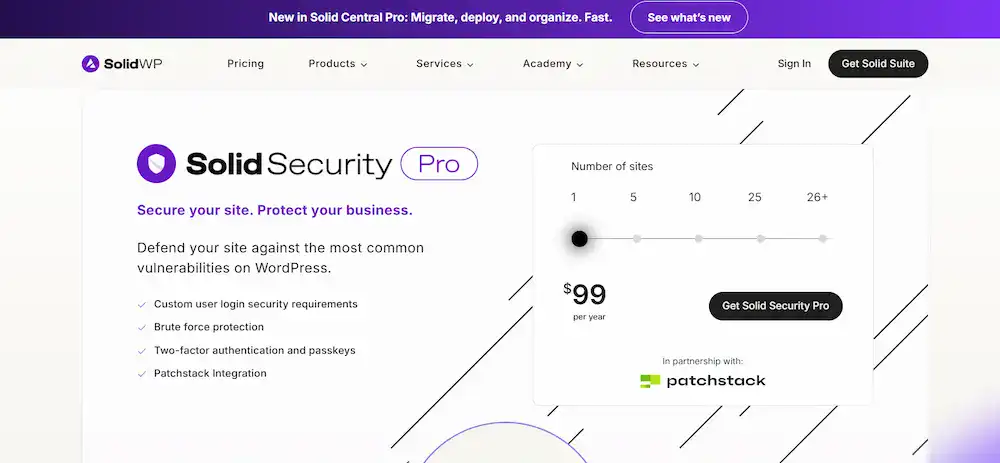
Its user-friendly interface simplifies complex settings, making it accessible even for beginners. SolidWP’s Solid Security Pro version adds advanced features like a web application firewall, two-factor authentication, and malware scanning. It focuses on implementing over 30 security hardening techniques to lock down your site.
Wordfence Security: Comprehensive Protection with Real-Time Threat Defense
Wordfence is arguably the most popular free WordPress security plugin, and for good reason. It offers extensive features in both its free and premium versions. The core of Wordfence is its endpoint firewall and malware scanner.

The WAF blocks malicious traffic before it hits your site, while the scanner checks your WordPress core files, themes, and plugins for malicious code. Its brute force attack protection is top-notch, limiting login attempts and enforcing strong passwords.
Wordfence also monitors live traffic to see who is visiting your site in real-time. For advanced users, the premium version offers real-time firewall rules and a premium threat intelligence feed.
Sucuri Security: Cloud-Based Protection for Enhanced Site Security
Sucuri is a well-known name in the security space. It offers a robust security suite focused on cloud-based protection. While its free version provides basic security hardening and malware detection, its true power lies in its premium WAF.

The Sucuri WAF routes all your site’s traffic through its servers, blocking attacks before they reach your host. It also includes a Content Delivery Network (CDN), which enhances performance.
A key feature of Sucuri’s paid plan is professional malware removal services. This means that if your site is ever hacked, their team will clean it for you. This makes it an excellent choice for businesses that need a hands-off, managed security solution.
MalCare Security: Automated Malware Removal and Real-Time Protection
MalCare stands out with its one-click, automated malware removal system. While many plugins can detect malware, MalCare provides a simple, one-click solution to clean your site.

Its cloud-based malware scanner is highly effective and won’t slow down your site, as it doesn’t run on your server. MalCare’s premium features include a powerful firewall, real-time protection, and login security.
It’s an ideal choice for site owners who want a reliable and easy-to-use malware detection and removal solution without the technical hassle.
Jetpack Security: Comprehensive Security Suite with Performance Enhancements
Jetpack, a popular WordPress plugin developed by Automattic, offers a suite of features, including security. Its security module includes real-time backups, brute force protection, and downtime monitoring.

One of the main advantages of Jetpack security is its seamless integration with the WordPress platform. The premium plans offer automated malware scanning and one-click restoration from a hacked site.
While it’s a multi-purpose tool and not a dedicated security solution, its features are robust enough for many users, especially those already using Jetpack for other functionalities.
All In One WP Security & Firewall: Beginner-Friendly Security Plugin
This is one of the most popular free security plugin options for beginners. All In One WP Security & Firewall offers an intuitive dashboard with a security strength meter that guides you through securing your site.
It provides core features like brute force protection, login security, and a basic firewall. This plugin excels at login protection and security hardening, offering features to hide the login URL, prevent user enumeration, and enforce strong password policies.
While it may lack some of the more advanced features of premium plugins, it’s an excellent choice for new site owners who want to implement basic security measures without cost.
BulletProof Security: One-Click Setup for Essential Security Features
BulletProof Security is a robust security plugin focusing on a strong .htaccess-based firewall. The plugin’s one-click setup makes activating its essential security features easy. It provides adequate brute force attack protection, login security, and database backups.

A key feature is its MScan Malware Scanner, which checks your WordPress files for suspicious code. While the user interface can be intimidating for non-technical users, it’s highly effective once configured. The pro version offers features like JTC anti-spam and more advanced firewall rules.
Defender Security: Comprehensive Protection with Advanced Features
Defender Security by WPMU DEV is a powerful and well-rounded security plugin. It offers complete tools to secure your site, including a malware scanner, file integrity monitoring, and login protection.

It also includes a robust firewall to block common attacks. Defender’s automated security scans and a comprehensive security audit log help you stay on top of your site’s protection.
For premium users, it integrates with WPMU DEV’s suite of products, including their hosting and performance plugins, offering a complete, all-in-one solution for your WordPress site.
WP Cerber Security: Advanced Protection Against Brute Force Attacks
WP Cerber Security is a powerful free security plugin known for exceptional brute force protection. It automatically blocks IP addresses that make too many failed login attempts and can even block traffic from specific countries.

The plugin also provides anti-malware security with integrity checks for WordPress core files. It can also manage user roles and restrict access based on IP addresses. For free WordPress security, WP Cerber provides a highly effective and targeted defense against the most common types of attacks.
SecuPress: Lightweight Security Plugin with Essential Features
SecuPress is a relatively new player that is quickly gaining popularity. It is a lightweight security plugin that focuses on simplicity and efficiency. Its core features include brute-force attack prevention, firewall rules, and a malware scanner.
SecuPress stands out for its user-friendly interface and a simple, step-by-step security checkup. The pro version offers more advanced security features like two-factor authentication, geo-blocking, and database backups. If you’re looking for a simple, effective, and non-intrusive plugin, SecuPress is an excellent choice.
Advanced Security Features to Enhance Your WordPress Site Protection
While a security plugin is a great start, a holistic security strategy involves a combination of tools and practices. Here are some key security features you should consider implementing.
Brute Force Protection
Brute-force attacks are among the most common threats to WordPress websites. These attacks use automated bots to guess your login credentials.
A good brute force attack protection plugin limits the number of failed login attempts from a single IP address, temporarily or permanently blocking the attacker. This simple but effective measure can stop most automated login attempts.
Malware Scanning and Removal
It is critical to scan your site for malicious code regularly. A malware scanner checks your files, database, and themes for known malware signatures and suspicious code.
While some free plugins can only detect malware, premium solutions often include a one-click malware removal feature or a service where security experts clean your hacked site.
Firewall Protection
A web application firewall (WAF) is your first line of defense. It filters incoming traffic, blocking known malicious requests before they can even reach your site.
An effective WAF can protect against SQL injections, cross-site scripting (XSS), and other common attacks. Some popular security plugins use an endpoint firewall that runs on your server, while others use a cloud-based WAF that filters traffic at the DNS level.
Two-Factor Authentication
Two-factor authentication (2FA) adds a critical layer of login protection. It requires users to provide a second form of verification, such as a code from a mobile app, in addition to their password.
This makes it exponentially harder for hackers to access your site, even if they manage to guess or steal a password. Many security plugins offer 2FA as a key feature.
Regular Backups
Backups are your safety net. A recent backup can save your site in a security breach, a successful malware attack, or a plugin conflict.
You should regularly create site backups of your WordPress files and database through a dedicated backup plugin or your security plugin’s features. This ensures you can quickly restore your site to a clean, working version.
Conclusion: Choosing the Right WordPress Security Plugin for Your Needs
Selecting the right security plugin is crucial in protecting your WordPress site. The best WordPress security plugins offer a blend of a strong firewall, reliable malware detection, and user-friendly features.
Whether you’re looking for a free WordPress security plugin like Wordfence or All In One WP Security, or a premium solution like Sucuri or MalCare, the key is to choose a tool that fits your technical knowledge, budget, and specific security requirements.
Remember, no single security plugin can provide 100% protection. The most effective strategy involves a multi-layered approach: keep your plugins and themes updated, use strong passwords, and choose a reputable plugin to handle the heavy lifting.
By taking these proactive security measures, you can significantly reduce the risk of a security breach and ensure your WordPress website remains safe and secure for years to come.
FAQs on Top WordPress Security Plugins
What are the most popular WordPress security plugins for 2025?
Some of the most popular WordPress security plugins include Wordfence, Solid Security, Sucuri, MalCare, and Jetpack Security. These plugins provide complete protection against malware, brute force attacks, and other security vulnerabilities while offering features like firewalls, login protection, and regular malware scanning.
Can I use other security plugins along with my main security plugin?
While running multiple security plugins is possible, it is recommended to avoid overlapping functionalities to prevent conflicts. Using a few security plugins that complement each other can improve website security without slowing down your site. For example, pairing a firewall plugin with a malware scanner can offer complete protection.
Are there free plans for WordPress security plugins?
Yes, several security plugins for WordPress offer a free plan. Wordfence, All In One Security, and MalCare provide limited free features such as basic malware scanning, login protection, and firewall rules. These free plans are ideal for beginners or small websites seeking essential protection without additional costs.
What other WordPress security plugins are recommended for advanced users?
Advanced users can consider plugins like Astra Security Suite, WP Cerber, and Defender. These security tools offer more granular controls, automated threat detection, and detailed reporting to address complex security vulnerabilities and provide complete protection for high-traffic or business-critical websites.
What is all-in-one security, and why should I consider it?
All-in-one security plugins combine multiple security tools into a single solution, including firewalls, malware scanning, login protection, and backups. They reduce the need to manage multiple plugins, minimize conflicts, and ensure that most security plugins’ essential features are covered in one package.

