


If you’re using WordPress, you’re already one step closer to setting up a robust knowledgebase and support hub. All you need is the right theme. These knowledge base WordPress themes are designed to deliver excellent user experience, easy navigation, and helpful features like search, feedback, and customization.
When your customers have questions, they want answers fast without waiting for a support agent. That’s where a knowledge base can help. A well-organized knowledge base website empowers users to find answers on their own, saving both time and resources.
In this article, we’ll explore the top knowledge base WordPress themes, their key features, pricing, and what to consider before choosing one.
What is a Knowledge Base Website?
A knowledge base is a centralized hub of helpful information. It includes FAQs, how-to guides, product documentation pages, and troubleshooting articles. The goal of this website is to help users find solutions independently without contacting your support team. By providing a self-service resource, businesses can reduce support tickets, streamline customer service, and build trust with their audience.
Learn: How to Convert HTML File to a WordPress Theme
Benefits of Using a Knowledge Base
There are several reasons to build a knowledge base for your business:
- Reduces support tickets: Customers find answers without submitting requests.
- Saves time for your support team: They can focus on complex issues instead of repetitive queries.
- Improves customer satisfaction: Users appreciate fast and accessible support.
- Boosts SEO: Help-articles can rank in search engines, which can drive traffic.
- Centralizes documentation: Everything users need is in one organized place.
According to studies, a well-structured knowledge base can cut down support tickets by up to 50%.
Tips for Setting Up a Knowledge Base on Your WordPress Site
Getting started is easy with the right tools. Here are steps to guide your setup:
- Organize your content: Gather FAQs, product manuals, and support articles.
- Choose your theme/plugin: Match your business needs and design preferences.
- Structure categories: Group articles by topic or product for easy navigation.
- Use clear headings: Help users scan and find what they need.
- Enable search and filters: Make it easy to locate answers quickly.
- Update regularly: Keep content fresh and relevant.
A clear and consistent structure improves both usability and SEO.
Need Help Setting Up a Knowledge Base?
Whether you’re starting from scratch or upgrading your current setup, our expert team can help.
Top WordPress Themes for Knowledge Bases
Here are the top-performing knowledge base themes for WordPress that are ideal for building customer-centric support hubs:
Knowledge Base Lite Free WordPress Theme
Knowledge Base Lite is a lightweight and free WordPress theme for creating simple yet functional knowledgebase websites. It offers a clean and minimal layout, making it easy to set up and manage content without any technical complexity. This WordPress website theme is ideal for users looking to launch a straightforward support center quickly.

Key Features
- Clean layout and easy setup
- Organized article categorization
- Customizable homepage sections
- Fully mobile responsive design
Best Suited For: Knowledge Base Lite is perfect for small businesses, bloggers, or solo entrepreneurs who need a basic, no-cost knowledge base to share tutorials, FAQs, or product support content with minimal effort.
Read about: Top Sustainable Web Design Trends in Digital Design
Flatbase Minimalistic and Responsive Knowledge Base Theme
Flatbase is a clean, minimalist WordPress knowledge base theme that blends modern design with practical support features. It’s designed to deliver a smooth and intuitive user experience, making it easy for visitors to find answers quickly. With built-in support for community forums and FAQs, it’s perfect for scalable support systems.

Key Features
- AJAX-powered live search
- Pre-built FAQ templates and support forums
- Fully responsive and retina-ready design
- Helpdesk integration using bbPress
Best Suited For: Flatbase is best suited for startups, SaaS companies, and digital product businesses that want to offer elegant, community-driven self-service support with a sleek, mobile-friendly interface.
Pricing: The price for this knowledge base WordPres theme is $49 with six months support. Check the demo.
What to Expect: Is a WordPress Consultation Right for You
Heroic Knowledge Base WordPress Plugin
Heroic KB is a powerful, premium WordPress knowledge base plugin for building professional knowledge bases and self-service support centers. It seamlessly integrates with most WordPress themes, is fully responsive across all devices, and offers intuitive tools to manage, organize, and present your support content.
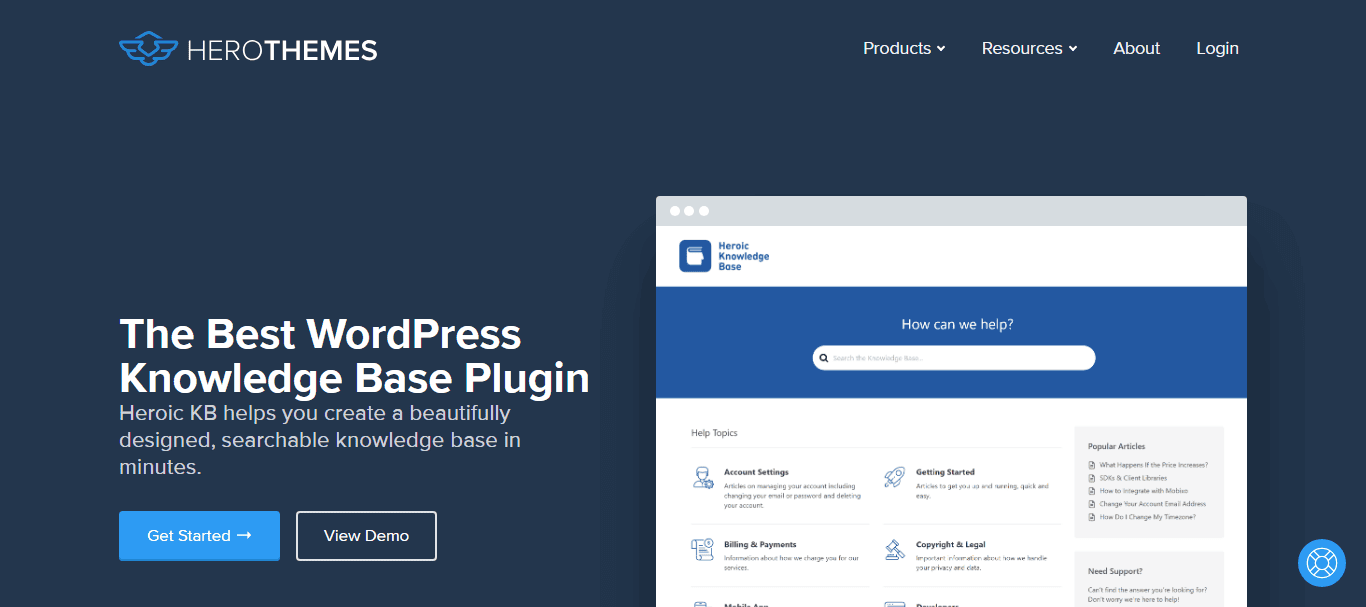
Key Features
- Drag-and-drop article ordering
- Instant live search with smart suggestions
- Article feedback and voting system
- Built-in in-depth analytics dashboard for performance tracking
Best Suited For: Heroic Knowledge Base is ideal for businesses of all sizes that want a reliable, scalable, and user-friendly support solution.
It’s especially beneficial for SaaS companies, eCommerce stores, agencies, and customer-focused service providers who wish to reduce support tickets, provide answers fast, and enhance the overall customer experience with a professional self-service portal.
Pricing: Heroic KB packages start at $149.50/year.
Simple Methods: Mastering the PSD to WordPress Conversion
Help Desk, Support & Knowledgebase Theme
Knowledgebase is a user-friendly WordPress theme designed to help you create a fully functional and interactive knowledge base with minimal effort. It offers live search, content tagging, and analytics to help you track user engagement. The deep integration with BuddyPress also makes it an excellent choice for creating forums.

Key Features
- Smart live search suggestions
- Article views and user feedback analytics
- Organized content hierarchy with tags and categories
- BBPress and BuddyPress integration
Best Suited For: KnowledgePress is ideal for businesses that want a fast, interactive support center with easy customization and basic performance tracking.
Pricing: This theme cost $59. Here’s a preview.
Know about: How to Create Scroll Over Interactive Elements in WordPress
Docly Developer-friendly Knowledge Base Theme
Docly is a modern, developer-friendly WordPress theme tailored for creating product documentation, API guides, and technical support requests content.
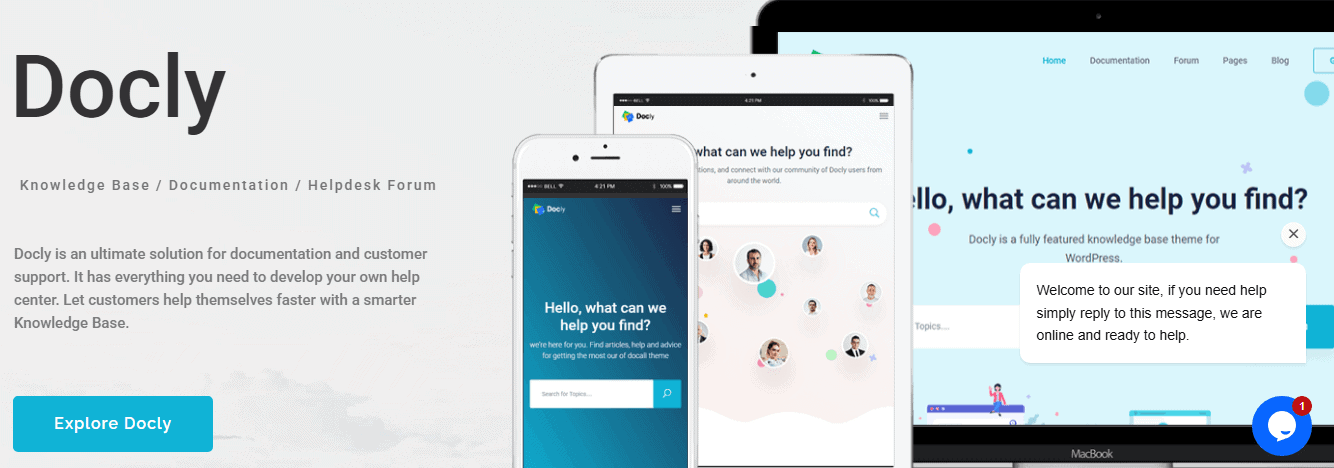
It offers a sleek interface with powerful features like article versioning and syntax highlighting, making it an excellent choice for tech-savvy businesses. Docly delivers a seamless reading experience across all devices and browsers.
Key Features
- Toggleable dark and light mode
- Sticky table of contents for easy navigation
- Article versioning and detailed changelogs
- Built-in syntax highlighting for code snippets
Best Suited For: Docly is ideal for SaaS platforms, API developers, and tech companies needing structured, version-controlled documentation website that’s easy to maintain, visually appealing, have a user friendly interface, and accessible for both technical and non-technical users.
Pricing: This WordPress theme is priced at $59 with 6 months support. Demo website.
Know more: Top Enterprise WordPress Agencies
KnowHow Premium WordPress Theme
KnowHow is a premium theme designed specifically for creating intuitive and efficient knowledge base WordPress websites.

With a strong focus on usability and clean design, it helps businesses organize and present their support content clearly. The theme includes live search, FAQ shortcodes, and media support, making it both flexible and user-friendly.
Key Features
- Built-in live search functionality
- Support for video tutorials and rich media
- Organized, category-based article structure
- Shortcode support for creating interactive FAQs
Best Suited For: KnowHow is best suited for companies looking to publish product documentation, employee onboarding resources, or internal knowledge sharing in a simple, searchable format that enhances user self-service and reduces support load.
Pricing: This premium knowledgebase theme also cost $59. Here’s the demo.
Guide to: Mastering Responsive Web Design Screen Sizes and Breakpoints
Lore WordPress Theme with bbPress Integration
Lore is a minimalist, content-focused WordPress theme that creates elegant and distraction-free knowledge bases. Its clean layout ensures users can easily navigate documentation and FAQs without clutter. With built-in bbPress integration and multilingual support, Lore makes it easy to create a user-friendly and accessible support environment.

Key Features
- Seamless bbPress integration for community-driven support
- Pre-designed FAQ and documentation templates
- Fully responsive layout for all device types
- RTL (Right-to-Left) language compatibility for global audiences
Best Suited For: Lore is ideal for businesses, startups, or creators who want a clean, no-frills knowledge base or support site with optional community features, multilingual capabilities, and a modern, professional look.
Pricing: This theme is priced at $59 and offers 6 months support. Check out the preview.
Read: JPG vs JPEG Differences and Correct Usage
MyKnowledgeBase Free WP Theme
MyKnowledgeBase is a lightweight, fast-loading WordPress theme designed to replicate the simplicity and structure of Wikipedia. Its minimalist layout keeps the focus on content, making it ideal for text-heavy documentation.

With straightforward navigation and no unnecessary features, MyKnowledgeBase is perfect for creating clean, efficient knowledge-sharing platforms with zero distractions.
Key Features
- Optimized for speed with a lightweight framework
- Clean, minimalist design focused on readability
- Ideal for internal team wikis or niche informational blogs
- Easy setup with no complex configurations
Best Suited For: MyKnowledgeBase is best suited for teams, educators, or bloggers who need a fast solution for internal documentation, knowledge bases, or informational content that values clarity and performance.
Ultimate Guide: Custom WordPress Development Services
Knowledgedesk Multilingual WordPress Theme
Knowledgedesk is a versatile and content-rich WordPress theme built for creating professional support pages, documentation portals, and self-service help centers.

With built-in features for FAQs, tutorials, and multilingual support, this theme is ideal for businesses that serve a global audience. It’s fully responsive, SEO-friendly, and designed to deliver a smooth user experience across all devices.
Key Features
- Advanced search filter for quick content discovery
- Pre-built templates for FAQs and tutorials
- Translation-ready with multilingual plugin compatibility
- SEO-optimized and fully responsive for all screen sizes
Best Suited For: Knowledgedesk is perfect for international businesses, SaaS platforms, and online services that require a multilingual knowledge base or help center with structured content and user-focused navigation.
Pricing: This WP theme cost $59. Here’s the demo.
Best Image Format: WebP vs PNG
Knowledge Guru with eLearning Capabilities
Knowledge Guru is a unique WordPress theme that blends traditional knowledge base functionality with e-learning elements.
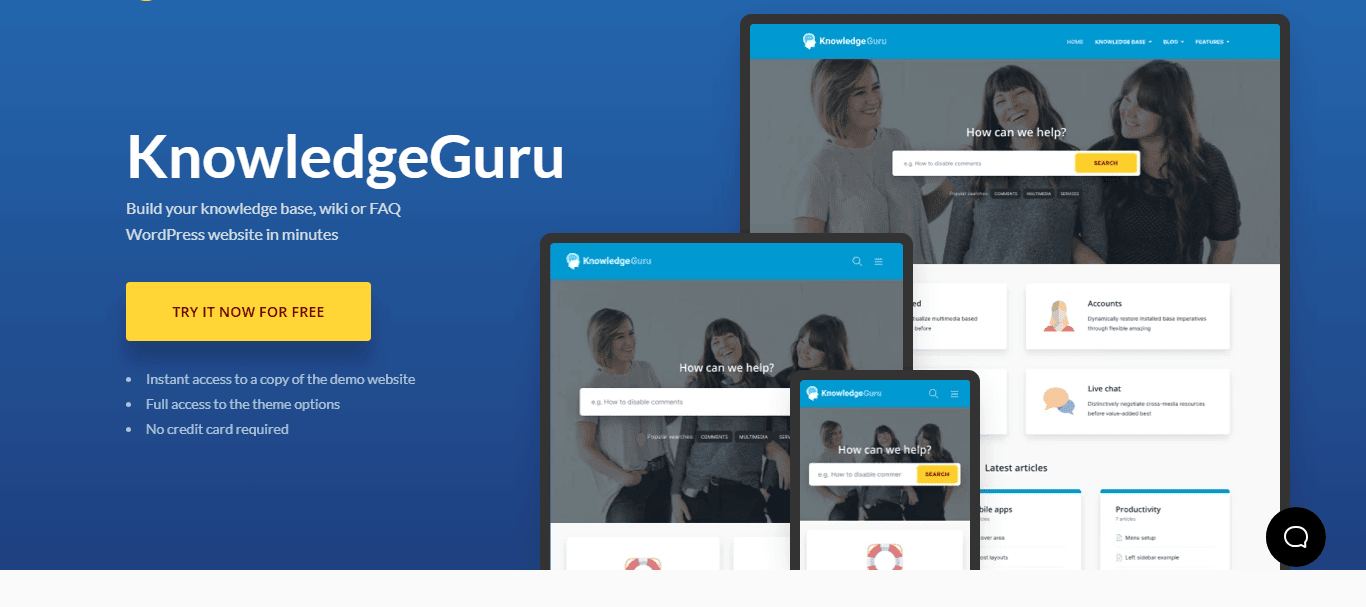
Designed with a course-like multiple layout options, it supports interactive learning experiences, making it ideal for training portals and educational support sites. Features like self-assessments, Q&A sections, and article feedback help reinforce learning and improve content engagement.
Key Features
- Built-in self-assessment tools for user knowledge checks
- Structured, course-like content layout for easy progression
- Interactive Q&A sections to boost user participation
- Article voting and engagement tracking for performance insights
Best Suited For: Knowledge Guru is best suited for educational platforms, HR teams, or companies delivering training materials, onboarding content, or internal learning systems that benefit from combining documentation with active learning tools.
Pricing: This is the most economical knowledge base theme at a price tag of $49.
Which Platform is Best: WordPress VIP vs WordPress.org
Choosing the Right Knowledge Base WordPress Theme
Selecting the right WordPress theme is essential for building a user-friendly knowledge base. The knowledge base theme you choose directly impacts how easily your visitors can find the information they need and how efficiently your team can manage the content. Here are the key factors to consider:
- Ease of Use: A theme with a simple setup process and intuitive navigation allows you to get your knowledge base up and running quickly. So, look for themes that offer one-click demo imports or built-in templates to save time.
- Customization Options: Your knowledge base should reflect your brand identity. Choose a theme that lets you customize fonts, colors, layouts, and even icons without requiring coding skills. This ensures consistency across your website.
- Responsive Design: A mobile-friendly theme is non-negotiable. Many WordPress users will access your knowledge base from their phones or tablets, so your site must be fully responsive and optimized for all screen sizes.
- Advanced Search Functionality: The WordPress search bar is one of the most used features in a knowledge base. A smart, predictive search helps users find relevant articles faster, improving the overall experience and reducing support requests.
- Article Management: Managing a growing library of articles should be easy. As such, look for features such as drag-and-drop article ordering, category filters, and support for tags. These tools make it easier to organize content and keep it up to date.
- Feedback and Analytics: To improve your content over time, choose a theme that supports article feedback (like thumbs up/down or star ratings) and usage analytics. These insights help you identify what’s working and what needs improvement.
Check out: WordPress Emergency Service to Handle a WordPress Site Crash
Free vs Premium Knowledge Base WordPress Themes: Which Should You Choose?
Choosing between a premium and free knowledge base theme depends largely on your budget, business goals, and the level of functionality you require.
While the free version of knowledge base themes can be a good starting point for small businesses, blogs, or internal use, they often lack the advanced features (like ajax search, premium support, or bootstrap framework) needed for scaling.
On the other hand, the premium versions are built for performance, user experience, more features, and long-term support, making them ideal for growing businesses and high-traffic support portals.
Here’s a quick comparison to help you decide which option best suits your needs:
| Feature | Free Themes | Premium Themes |
| Cost | Free to use, ideal for limited budgets | One-time or subscription-based cost, depending on the developer |
| Design & Layout | Basic design with limited layout options | Highly customizable with multiple layout and style variations |
| Ease of Setup | Generally easy to install, but limited documentation | Usually comes with demos, guides, and setup support |
| Customization | Basic customizer options; limited branding control | Advanced customization (colors, fonts, headers, footers, etc.) |
| Search Functionality | Basic search; may lack live or predictive search | Advanced search with filters, live suggestions, and keyword matching |
| Article Management | Simple categorization and tagging | Enhanced organization, drag-and-drop sorting, and metadata support |
| Responsiveness | Most are mobile-friendly | Fully responsive, optimized for all screen sizes |
| Support & Updates | Limited or community-based support | Dedicated customer support and regular updates |
| Feedback & Analytics | Usually not included | Built-in analytics, feedback forms, and user engagement tools |
| Scalability | Suitable for small sites or internal use | Designed for larger knowledge bases with room to grow |
In summary, if your needs are basic and your budget is tight, starting with a free theme like Knowledge Base Lite or MyWiki makes sense.
But if you’re planning to grow, need more control over design, or want better user engagement, investing in a premium theme like Heroic Knowledge Base or KnowHow will give you a significant edge in providing exceptional support.
Learn: Master the Art of Triadic Color Palettes
Bonus: WordPress Knowledge Base Plugins You Can Use
You don’t necessarily need a full or perfect theme to create a knowledge base. WordPress plugins can do the heavy lifting while letting you use your existing theme. Popular knowledge base and help desk plugin options include:
- BetterDocs: Offers instant search, analytics, and beautiful layouts.
- weDocs: Free, lightweight plugin for organizing documentation.
- BasePress: Allows for multiple knowledge bases, article feedback, and customizable design.
These plugins work well with most themes and can help you scale your knowledge base without starting from scratch.
Summary
A strong knowledge base is a win-win for both businesses and customers. It empowers users with instant answers and eases the workload for support teams. Whether you choose a free or premium WordPress theme, what matters most is creating a well-organized, accessible, and user-friendly support hub.
From clean and modern design and elegant layouts to advanced features like live search and analytics, these top WordPress knowledge base themes offer everything you need to build a successful support site with unlimited knowledge bases.
Combine them with the right plugins, track performance, and keep your content updated, and you’ll be well on your way to delivering exceptional customer support.
So, pick a theme that fits your brand and start empowering your users with self-service support today with your own knowledge base!

