

Managing a single WordPress site can be a demanding task. You must handle everything from core updates to plugin and theme maintenance, security monitoring, and backups. Now, imagine doing that for multiple WordPress sites. The complexity and time commitment can quickly become overwhelming. This is where the best WordPress management tools come in. They are essential for anyone who needs to manage multiple WordPress sites efficiently and effectively.
Whether you’re a freelancer, a digital agency, or a business owner with multiple websites, a good WordPress management tool can centralize your workflow. It enables you to perform critical maintenance tasks, monitor site performance and security, and manage all your sites from a single, intuitive dashboard.
This saves you countless hours and reduces the risk of human error. The proper management tool is no longer a luxury; it’s necessary to maintain healthy, secure, and high-performing WordPress websites.
Understanding WordPress Site Management Basics
At its core, WordPress management involves a series of recurring tasks to ensure a site remains secure, fast, and functional. These tasks include:

- Updates: For security and performance, it is crucial to keep the WordPress core, plugins, and themes updated to their latest versions.
- Backups: Regular, reliable backups are your safety net. They enable you to restore your site quickly in the event of a crash or hack.
- Security: Proactively protecting your site from security threats through malware scanning, firewalls, and security hardening.
- Performance Monitoring: Checking site speed and performance to ensure a good user experience and better SEO rankings.
- Uptime Monitoring: Ensuring your site is always live and online.
- User Management: Controlling access and roles for all WordPress users across your sites.
Completing these tasks manually for each WordPress site is incredibly time-consuming. A centralized WordPress management solution automates these processes, allowing you to focus on growth and strategy.
Keep Your WordPress Sites Running Flawlessly
Focus on growing your business while our expert team handles updates, security, backups, and performance optimization.
Common Challenges in Managing Multiple WordPress Sites
Juggling multiple WordPress websites presents a unique set of challenges. Without the right tools, you might find yourself:
- Wasting Time: Logging in and out of different WordPress dashboards for each website maintenance task.
- Forgetting Updates: Missing critical updates for a WordPress theme or plugin on one of your sites, leaving it vulnerable.
- Losing Track of Security: You may be struggling to keep up with security monitoring, and a single site security issue could compromise your entire network.
- Handling Inconsistent Configurations: Having different plugins, settings, or update schedules across multiple sites can lead to inconsistencies.
- Lack of Oversight: Without a unified view, it’s challenging to get a complete picture of the health and performance of all your WordPress sites.
These challenges underscore the need for a dedicated management tool to help you manage multiple WordPress sites with confidence and control.
Why Use WordPress Management Tools? Benefits Explained
The benefits of using WordPress management tools are clear and impactful, particularly for those managing multiple sites.
- Time Savings and Efficiency: A centralized dashboard lets you perform bulk management actions. With just a few clicks, you can update themes and plugins, run backups, and conduct security checks on all your sites at once, massively boosting your productivity.
- Enhanced Security: Management tools offer advanced security features, including malware scanning and uptime monitoring. You’ll receive instant alerts for any suspicious activity or downtime, allowing for a rapid response to security threats.
- Improved Site Performance: Many WordPress management tools include performance monitoring. You can track site speed and identify issues that affect user experience.
- Streamlined Maintenance: Automating routine tasks, such as backups and updates, ensures a consistent WordPress maintenance schedule.
- Centralized Control: A single dashboard provides a comprehensive overview of all your sites. You can see which sites need updates, check backup statuses, and monitor performance all in one place.
- Cost-Effectiveness: While premium tools have a cost, the time saved and the prevention of costly security breaches or site failures often make them a sound investment.
In short, a robust WordPress management service transforms the daunting task of managing multiple WordPress sites into a streamlined, efficient, and secure process.
Must-Have Features in a WordPress Management Tool
Not all WordPress management tools are created equal. When evaluating a new WordPress management tool, look for these essential features:
- Centralized Dashboard: A single dashboard is the cornerstone of any effective management tool. It should provide an intuitive interface for managing WordPress sites from a single, central location.
- Bulk Updates: The ability to update WordPress core, plugins, and themes across multiple websites with a single click is a non-negotiable feature for saving time.
- One-Click Staging: A staging environment lets you test updates or changes without affecting your live WordPress site. This is a powerful feature for preventing site-breaking errors.
- Reliable Backups and Restoration: Look for automated, off-site backups and a simple one-click restoration process. These are your most crucial essential management tools for disaster recovery.
- Security Monitoring and Malware Scanning: Continuous security monitoring and automatic malware scanning are vital for protecting multiple sites.
- Uptime Monitoring: Get instant notifications if a WordPress site goes down.
- Client Reporting: For agencies, professional client reports are a great way to demonstrate the value of your work.
- User Management: The ability to manage WordPress users and their roles across unlimited sites.
Integration with Other Platforms and Services
The best WordPress management tools don’t operate in a vacuum. They integrate with other services to provide a more comprehensive solution. Key integrations to look for include:
- Google Analytics Integration: Connect your Google Analytics account to view traffic data directly within your dashboard. This provides valuable insights into website performance.
- Uptime and Performance Monitoring: Many tools use third-party services to check site performance and uptime.
- Backup Solutions: Tools often integrate with cloud storage services like Google Drive, Dropbox, or Amazon S3 for secure, off-site backups.
- Security Services: Integrations with malware removal services or web application firewalls (WAFs) can provide advanced security measures.
- Git and Version Control: Integration with Git repositories is a significant advantage for developers, enabling streamlined development workflows.
Top WordPress Management Tools to Consider
The market for WordPress management tools is highly competitive, with numerous options catering to diverse needs. Here’s a look at some of the most popular choices.
WP Umbrella: Productivity and Insights
WP Umbrella is a relatively new WordPress management tool that offers a clean, user-friendly interface and provides powerful insights. It offers a suite of essential management tools, including:
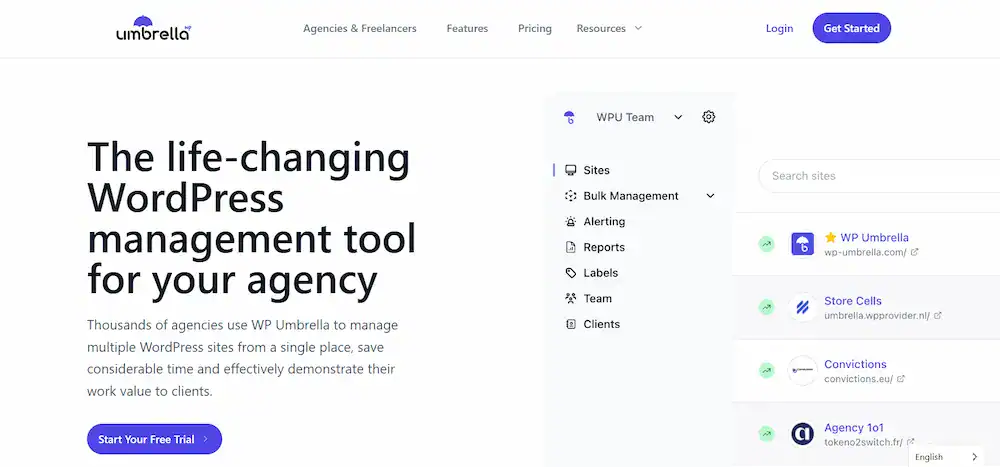
- Uptime Monitoring: Real-time uptime monitoring with instant alerts.
- Performance Monitoring: Checks key performance metrics and identifies site speed issues.
- Backups: Provides secure, automated backups and one-click restoration.
- Security Monitoring: Scans for vulnerabilities and provides alerts.
- Google Analytics Integration: View your traffic data directly in the centralized dashboard.
- PHP Error Monitoring: A unique feature that alerts you to PHP errors and other technical issues, incredibly helpful for debugging.
WP Umbrella is an excellent choice for those who value a simple, intuitive design and a focus on performance and productivity. Its flat pricing model for unlimited sites makes it particularly appealing for agencies.
BlogVault: Backup and Security Focused
BlogVault is widely recognized for its robust backup solution and functions as a powerful WordPress management tool. It’s a comprehensive platform that bundles essential features, making it an excellent option for those who want an all-in-one package.

- Reliable Backups: BlogVault’s core strength is its incremental backup system, which saves only the changes made to your site. This ensures reliable backups that are fast and don’t strain your server.
- One-Click Restoration: The tool offers one-click restoration and even a “Test Restore” feature to check your backup before you go live with it.
- Integrated Security: BlogVault includes MalCare, a robust security solution with automatic malware scanning and one-click malware removal services.
- Staging and Migration: With a single click, you can create a staging environment and easily migrate your WordPress website to a new host with zero downtime.
- Centralized Dashboard: Its dashboard allows you to manage WordPress sites in bulk, handling updates, backups, and security scans for unlimited websites.
BlogVault is an excellent choice for those who prioritize backups and security and want a simple, powerful, and integrated solution.
WP Remote: Secure and Intuitive
WP Remote offers a straightforward and intuitive platform for managing WordPress websites. It’s designed for simplicity and security, making it an excellent choice for users who don’t need a host of advanced features.

- Simple Interface: The user-friendly interface makes it easy for anyone to get started with website management tasks.
- Secure Connection: It connects to your sites using a safe, token-based system, eliminating the need to share login credentials.
- Backups: WP Remote provides automated, off-site backups to a secure cloud server.
- Core Tasks: It allows for one-click updates of WordPress core, themes, and plugins across multiple sites.
- Uptime and Performance: The tool includes uptime monitoring and basic performance checks.
WP Remote is a solid choice for freelancers and WordPress site owners who need a reliable and secure solution for basic maintenance tasks without the complexity of more feature-rich platforms.
ManageWP: Comprehensive SaaS Management
One of the most well-known WordPress management tools, ManageWP, offers a robust, cloud-based platform for managing WordPress sites. It’s a comprehensive SaaS solution with a wide range of features:

- Centralized Dashboard: A powerful centralized dashboard to control unlimited websites.
- Bulk Management: Update themes and plugins, manage users, and optimize databases for all your sites simultaneously.
- Reliable Backups: Provides reliable backups with one-click restore functionality.
- Security Monitoring: Offers solid security monitoring with malware scanning and vulnerability alerts.
- Uptime Monitoring: Alerts you via email or SMS if your sites go down.
- Client Reporting: Generate professional, white-label client reports to showcase your work.
- Add-ons: A wide variety of paid add-ons for SEO ranking, performance checks, and more.
ManageWP’s free plan is a great starting point for beginners, while its comprehensive paid plans and add-ons make it a scalable solution for agencies.
MainWP: Self-Hosted and Customizable
MainWP stands out as a unique, self-hosted solution. Unlike the other tools that are SaaS platforms, MainWP is a free plugin you install on your own WordPress site to serve as your central dashboard.
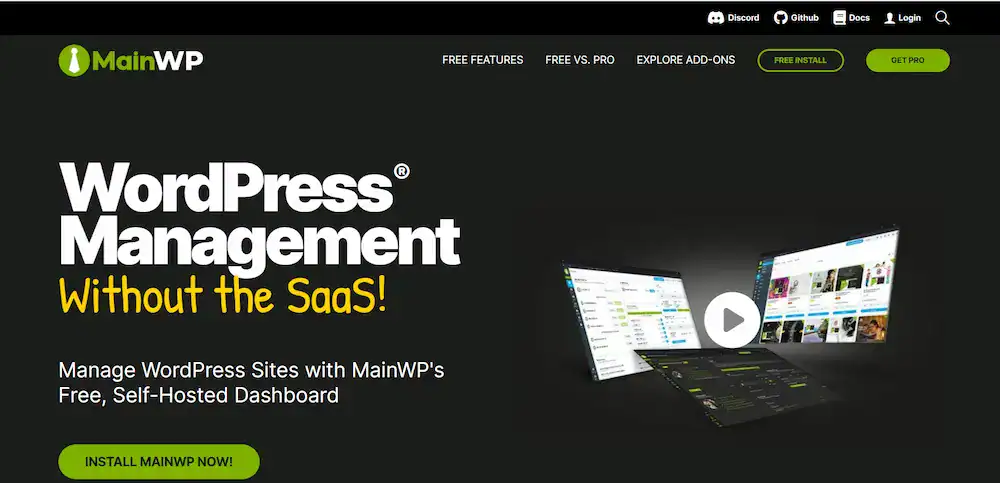
- Self-Hosted Control: You host the dashboard, giving you complete ownership and control over your data. This is a significant advantage for those concerned with data privacy.
- Scalable and Free: The core plugin is completely free and allows you to control multiple WordPress websites without limit.
- Extensive Extensions: MainWP’s power comes from its premium extensions. You can purchase extensions for backups, uptime monitoring, SEO, client reports, and more.
- Open Source: The open-source nature means a large community of developers contributes to its development, offering immense flexibility.
MainWP is the perfect fit for technically savvy WordPress site owners and agencies who want a free core solution and prefer a self-hosted, customizable approach.
InfiniteWP, CMS Commander, The Hub, Jetpack, and Other Options
- InfiniteWP: Like MainWP, InfiniteWP is a self-hosted tool with a free core version and premium add-ons. It’s a popular choice for agencies that need a flexible, on-premise solution.
- CMS Commander: This tool focuses on content management alongside general WordPress maintenance. It’s great for managing content and WordPress users across multiple websites.
- The Hub (WPMU DEV): The Hub is WPMU DEV’s powerful WordPress management solution. It is tightly integrated with their hosting and plugins, offering a full suite of security, performance, and maintenance features from a single dashboard. It’s an excellent option for WPMU DEV members.
- Jetpack: Jetpack is a popular plugin that offers a wide range of features, from security to performance optimization. It includes a management dashboard for managing multiple WordPress sites and is a solid, well-known option for those who want a simple, trusted solution.
Self-Hosted vs. SaaS Management Tools
Deciding between a self-hosted and a SaaS WordPress management tool is a critical choice that impacts control, security, and maintenance.
- SaaS (Software as a Service): Tools like ManageWP and WP Umbrella are hosted on the provider’s servers. They are easy to set up and use, with the provider handling all the maintenance and updates for the dashboard itself. The main drawback is that you are trusting a third party with your data.
- Self-Hosted: Tools like MainWP and InfiniteWP are plugins you install on your WordPress site. You have complete control over your data and the server. This offers superior privacy and customization but requires more technical knowledge to set up and maintain the central dashboard.
For most WordPress site owners and small agencies, a SaaS solution offers the best power and ease of use. However, larger agencies or those with strict privacy requirements often prefer a self-hosted tool.
How to Choose the Right WordPress Management Tool
Choosing the right WordPress management tool depends on your specific needs. Here’s a quick guide to help you decide:
- Assess Your Needs: How many websites do you manage? What are your most critical tasks (e.g., backups, security, performance)?
- Consider Your Budget: Are you seeking a free solution, a per-site payment, or a tiered subscription?
- Evaluate Technical Skill: Are you comfortable with a self-hosted tool and managing your server, or would you prefer the simplicity of a SaaS solution?
- Look for Key Features: List your non-negotiable features, such as one-click updates, staging, or Google Analytics integration.
- Test the Interface: Most tools offer a free trial. Test the user-friendly interface and workflow to see if it fits your style.
Best Practices for Using WordPress Management Tools Effectively
Implementing these best practices ensures your WordPress sites remain secure, fast, and well-maintained while saving you time and effort.
- Audit Your Sites: Before connecting your sites, take a complete inventory. Clean up old plugins and themes to improve site performance.
- Establish a Routine: Use your management tool to set up a regular WordPress maintenance schedule. Automate backups and updates to run at off-peak hours.
- Configure Alerts: Set up alerts for uptime monitoring, security issues, and updates. This allows for a proactive approach to site management.
- Use Staging Environments: Always test major updates on a staging site before deploying them to your live WordPress website. This prevents unexpected issues.
- Use Strong Passwords and Permissions: Ensure that all WordPress users manage their accounts with strong passwords and that user roles are assigned correctly to limit access.
Security Compliance and Data Privacy in WordPress Management
Data privacy and security are more critical than ever. When using a WordPress management service, you entrust a third party with access to your sites and potentially sensitive data.
- GDPR and CCPA Compliance: If your sites serve users in the EU or California, you must comply with regulations like GDPR and CCPA. Check that your management tool has features to support this, such as cookie consent and data access/deletion requests.
- Data Handling: Understand how the service handles your data. Does it store your backups? Where are the servers located? This is where self-hosted solutions like MainWP can offer a significant advantage, as all data remains under your control.
- Advanced Security Measures: Look for tools that offer advanced security measures, such as two-factor authentication, malware scanning, and the ability to set global security rules for all your sites.
AI and Future Trends in WordPress Management
The future of WordPress management is increasingly moving toward automation and intelligence.
- AI-Powered Updates: AI is already being used to test updates in a sandbox environment before they are applied to your live site, predicting potential conflicts.
- Predictive Maintenance: Tools will use machine learning to predict when a WordPress site will likely experience an issue, allowing for preventative action.
- Enhanced Security: AI-powered security tools will improve their ability to identify and neutralize zero-day exploits and sophisticated security threats in real time.
These future trends promise to make website management even more efficient, secure, and hands-off for WordPress site owners.
Conclusion
A high-quality WordPress management tool is a game-changer for anyone who needs to manage multiple WordPress sites. By centralizing workflow, automating routine tasks, and providing a comprehensive overview of your unlimited sites, these tools save you time, enhance security, and ensure excellent site performance.
Whether you opt for a comprehensive SaaS solution like ManageWP, a self-hosted powerhouse like MainWP, or an insightful tool like WP Umbrella, the key is to choose a service that aligns with your specific needs. By using the best WordPress management tools and following best practices, you can keep your sites running smoothly and focus on what truly matters: growing your business.
FAQs About WordPress Management Tools
How can I manage multiple WordPress websites from a single dashboard?
A centralized dashboard in a WordPress management tool allows you to monitor updates, backups, and performance for all your sites in one place. This makes managing multiple sites easier, especially for agencies handling unlimited WordPress sites.
Can I efficiently manage plugins and themes across multiple sites?
Yes. The best WordPress management tools enable you to simultaneously update, activate, or remove plugins and themes across multiple sites. This reduces manual work and ensures all your sites stay secure and up-to-date.
Do these tools support unlimited website usage for agencies or freelancers?
Many WordPress management tools offer plans that support unlimited website usage, making them ideal for WordPress agencies or freelancers managing multiple clients without restrictions.
How do WordPress management tools help with website security and core WordPress files?
Management tools often include malware scanning, firewall protection, and automatic backups. They also monitor core WordPress files for changes, keeping your sites secure and maintaining integrity even if you have minimal technical knowledge.
Can I integrate Google Analytics and track site management tasks from a single location?
Absolutely. Many tools integrate with Google Analytics, allowing you to track traffic, user engagement, and other performance metrics. Combined with task automation, this enables efficient management of updates, backups, and other site management tasks across multiple websites.

